Create packaging designs faster with the best Pacdora alternatives. This guide covers 7 powerful tools with realistic 3D mockups, customizable dielines, and simple workflows to help you find a more flexible and affordable packaging design solution.
Pacdora is the largest packaging mockup and dieline platform, known for combining 3D mockups and real-time previews into a single tool. But it’s not perfect. The tool has limited pre-built templates, the interface is not beginner-friendly, and the free plan is quite limited.
We tested and compared the 7 best Pacdora alternatives based on real use cases, curating the best ones to simplify your search. Modor mockup generator works best for fast, realistic mockups, Canva is reliable for simple design work, and Packify stands out for AI-based concept creation.
Let’s learn about each tool in detail.
Key Takeaways
The best Pacdora alternative isn’t a single tool. It depends on your primary goal: do you need a technical dieline (like Pacdora makes) or just a visual free mockup?
AI and automation are the biggest new trends for Pacdora alternatives. AI-powered photoshoots let you generate realistic packaging mockups without a physical product, a feature Pacdora itself is also exploring.
Don’t pay for Pacdora just for visuals. If you only need high-quality mockups, a mockup-specialized Pacdora alternative like Modor gives you unwatermarked, pro results at an affordable price.
Pandora Overview: Limitations and Best Alternatives
So, what’s Pacdora? Pacdora is a comprehensive, browser-based, all-in-one solution for packaging design. It’s not just a simple mockup tool; Pacdora is a complete, integrated suite.
Its core feature is mashing three tools into one: a mockup generator, a real-time 3D modeling interface, and a dieline template maker. This makes the Pacdora workflow seamless. You can design on a dieline and see the 3D model update in real time.
With a library of over 3,000 templates, Pacdora’s main strength is expert-level output. Pacdora supports 8K renders, 4K video renders, and exports print-ready files (AI, PDF, DXF). This is why so many people start with Pacdora.
Why You Might Need a Pacdora Alternative?
If Pacdora is so powerful, why bother looking for a Pacdora alternative? It basically comes down to cost, complexity, and the fact that other tools are now keeping up with the trends. This is why many users start searching for Pacdora alternatives that offer similar features without the limitations.
Restrictive free plan: Pacdora’s free plan is super restrictive. It slaps watermarks on all exports and limits dieline downloads. This makes it useless for any real professional work, and it’s the number one reason people seek a Pacdora alternative.
The Cost: The Pacdora Pro plan (about $29/month) is expensive if you’re a freelancer who only needs a few mockups a month. A cheaper or even a free Pacdora alternative is often the answer.
Overkill Factor: Pacdora is often way too complex if your goal is just a quick marketing image. A simpler Pacdora alternative, like Modor or Placeit, is much, much faster.
The AI Gap: Pacdora is, at its heart, a technical 3D tool. Latest Pacdora alternatives like Packify are leaning much harder into generative AI for concepting and scene creation, enabling a faster workflow.
Key Features to Look for in Pacdora Alternatives
As you’re shopping for a Pacdora alternative, keep this checklist in mind. Choosing between different Pacdora alternatives depends on your specific needs.
Dieline Generation: Does the tool create print-ready vector dielines (PDF, AI, DXF)? Or just a visual 3D model? This is the most important question to ask.
3D Visualization: How good is the preview? Does it offer a real-time, 360-degree rotatable preview? Can you adjust the lighting and materials? Pacdora is good at this, but so are some Pacdora alternatives.
Mockup Library Size & Type: How big is the library, and does it actually have what you need (e.g., supplement bottles, mailer boxes)? How does it compare to Pacdora’s 3000+ templates?
Ease of Use: Is it a simple drag-and-drop interface (like Modor) or a complex 3D editor (like provisual.app)? Pacdora itself has a learning curve.
AI Integration: Can it help you brainstorm? Look for AI Photoshoot features (Packify) or just a quick mockup with AI blending (Modor).
Export Quality & Formats: What can you get out of the tool? You need high-res JPG/PNG for marketing, but vector PDF/AI/DXF for manufacturing, a key Pacdora feature.
Pricing Model: How do you pay? Is it a 100% free Pacdora alternative, freemium-based, or subscription-only?
Best 7 Pacdora Alternatives
Alright, let’s dive into the detailed comparisons of the best Pacdora alternatives.
Modor
About Modor
Modor is a browser-based AI generator focused on speed and realism. It’s not a complex 3D editor, it’s a drag-and-drop mockup tool that gives you a perfect image. It is also one of the most practical Pacdora alternatives, providing quick output.
Key Features
Library Size: You get access to over 5,000+ templates. This covers apparel, devices, and standard packaging well.
Ease of Use: It’s a dead-simple drag-and-drop interface. No software to install, no 3D knowledge needed.
High-Resolution Output: It supports HD downloads (usually 3000x2000px) in JPG or PNG.
Standout Features
AI Surface Blending: Modor’s AI automatically blends your design onto the product, realistically faking the lighting and shadows.
Instant Social Media Resizing: A huge time-saver. You can instantly re-crop your mockup for various social media and e-commerce platforms.
Cons
No Dielines: This is an online mockup generator. It cannot create manufacturable dielines like Pacdora.
Limited 3D Control: It lacks the deep 3D modeling and multi-item scene building.
Pricing
Free Plan: The free plan is fantastic. You get access to thousands of templates, free commercial use, and no watermarks.
Pro Plan (starts at $15/month): This unlocks all premium mockups, delivers even higher-quality downloads, and adds brand asset management to save your brand logos and colors.
Final verdict
This is a no-brainer for marketers and e-commerce owners who need photorealistic, high-quality packaging mockups fast. Easily one of the best Pacdora alternatives for quick visuals.
Canva
About Canva
You already know Canva. It’s a complete design hub. It’s not a specialized packaging tool, but its realistic mockups make it a powerful Pacdora alternative for basic mockups. As it offers free packaging design templates, you can also consider it a free alternative to Pacdora for simple use cases.
Key Features
Integrated Workflow: You can design your label (using hundreds of assets) and apply it to a mockup without ever leaving the tab.
Massive Asset Library: You get access to millions of stock photos, fonts, and graphics.
Team Collaboration: It’s the best tool on this list for sharing, commenting, and getting team approval on designs.
Standout Features
SmartMockups Feature: A built-in library of thousands of mockup templates (mugs, cosmetics, boxes, tech) that are just plain simple to use. Many are free mockup options.
Third-Party Apps: It has a vast ecosystem of apps that add AI features, cool effects, and more.
Cons
No Dielines: You cannot get dielines from Canva. It’s not a genuine Pacdora replacement for production. Don’t even try.
Static Mockups: The 3D models aren’t really 3D. You can’t rotate them freely like in Pacdora. You’re just pasting your 2D design onto a static photo.
Pricing
Free Plan: This includes basic tools and a limited selection of free mockups.
Canva Pro ($15/month): You’ll quickly hit the free plan’s limitations. The pro plan is where the real value is, and the good news is, it’s still a cheaper option than Pacdora.
Final verdict
Best for small businesses and teams already in the Canva ecosystem who just need simple packaging mockups and not the full power of Pacdora.
Provisual.app
About Provisual.app
This one is different. Provisual.app is a specialized, browser-based 3D mockup generator. It’s a designer’s Pacdora alternative for those who only want granular 3D control.
Key Features
Real-time 3D Rendering: You can see changes to your model, lighting, and textures as you make them.
Advanced Control: You can tweak material properties (metallic, matte), textures, and lighting.
Camera Control: Unlike simpler tools, you get to control the 3D camera angles to find that perfect, dramatic shot.
Standout Features
Advanced 3D Control: This is its main value. It offers deep customization of 3D scenes, including dynamic lighting and multi-layered designs, far beyond a simple free mockup.
Project Sharing: It lets you share interactive 3D visuals with clients, who can then rotate the model themselves. This is a huge flex and something that Pacdora also offers.
Cons
Only a 3D Tool: It has no 2D graphic design or AI tools. You have to bring your own finished 2D designs.
Restrictive Free Plan: The free plan is minimal (few projects, low-res screenshots, personal use only). It’s worse than Pacdora’s free plan.
Smaller Library: It has a smaller template library than the big all-in-one platforms like Pacdora.
Pricing
Free: Very limited, for personal use only.
Pro ($29/month): This is in the same ballpark as Pacdora, so it’s a direct competitor for expert designers.
Final verdict
This is for professionals and agencies who already have their 2D designs and need a powerful, dedicated tool for high-end packaging mockups. One of the most accessible Pacdora alternatives for non-designers.
Kittl
About Kittl
Kittl is an all-in-one, browser-based graphic design platform. It’s gained a strong following and is a real creative’s Pacdora alternative.
Key Features
AI-Powered Generation: It has AI tools for both vector and image generation from text prompts. This is a big step beyond what Pacdora currently offers in AI.
Advanced Text Transformation: You can easily warp, add shadows, and apply complex effects to text.
AI Utilities: Includes handy tools like an AI Background Remover and an AI Image Upscaler.
Template Library: It has a vast library of templates, fonts, and design elements, often with a more artistic, illustrative vibe.
Standout Features
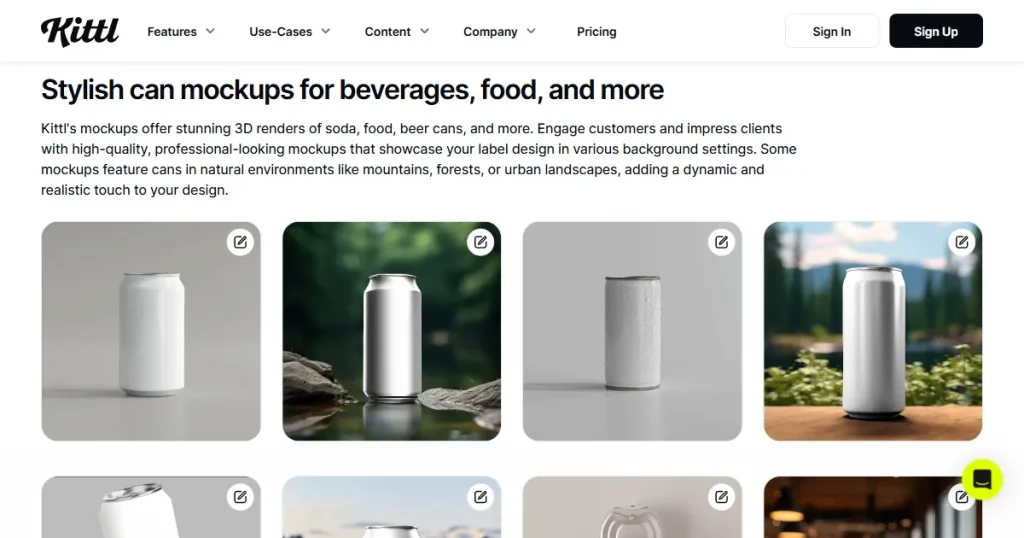
AI Mockup Generator: It can generate mockups from a text prompt or apply your designs to its library of apparel, print, and packaging mockups.
Advanced Typography: Kittl offers industry-leading control over text effects. This makes it a favorite for logo and t-shirt designers.
Cons
Restrictive Free Plan: Limited projects and only gives you a small, single-use batch of AI credits.
No Dielines: Just like Canva, it cannot generate or edit custom 3D dielines. This is a visual Pacdora alternative only, not a production tool.
Learning Curve: Due to the advanced features, the learning curve is a bit steeper than Canva’s.
Pricing
Free: Limited projects, low-res exports, and minimal AI credits.
Pro ($15/month): This is a very affordable Pacdora alternative packed with creative tools.
Final verdict
This is a fantastic tool for designers focused on t-shirts and logos who want robust AI design. It’s the designer’s favorite Pacdora alternative.
Placeit
About Placeit
Placeit by Envato, is a massive web-based mockup generator. It’s not a subtle Pacdora alternative; it’s a content machine built for speed and volume.
Key Features
Massive Library: You get access to over 30,000+ templates. It has a dedicated, extensive section on packaging. Pacdora can’t compete with that sheer volume.
Extreme Simplicity: It has a straightforward drag-and-drop interface built for non-designers. You just upload your flat JPG or PNG label, and it auto-adjusts.
Bonus Tools: It also includes a built-in logo maker and basic graphic design tools.
Standout Features
Video Mockups: Placeit lets you place your design onto moving objects (like a person holding a can). This is something Pacdora doesn’t do well.
Cons
Zero Dieline Capability: Do not use this for manufacturing. It is 100% a marketing visualization tool. It isn’t a Pacdora alternative for production.
Cookie-Cutter Feel: With so many templates, a lot of the scenes are overused. Your product might look generic compared to Pacdora’s custom 3D scenes.
Pricing
Free Account: You get limited access to some free mockup templates, but they’re often lower-resolution or watermarked.
Unlimited Subscription ($14.95/month): The annual plan (around $7.47/month) is a bargain if you need a lot of packaging mockups.
Final verdict
This is the go-to for marketers and dropshippers who need a high volume of good enough packaging mockups. Not a genuine Pacdora replacement.
Packify
About Packify
Packify is a modern, AI-first platform. This Pacdora alternative is focused on generating packaging concepts from scratch using simple text prompts.
Key Features
AI Concept Generation: You use a chat interface to describe your packaging (e.g., a sleek, black supplement bottle), and the AI generates the 3D structure. This is next-level stuff compared to Pacdora’s current toolkit.
Browser-Based Editor: It features a simple editor for refining the materials, textures, and angles of your AI-generated models.
High-Speed Rendering focuses on fast concept generation, enabling you to brainstorm quickly.
Standout Features
AI Photoshoot: This is the real key differentiator- text-to-3D mockup. It instantly places your 3D packaging model into realistic, AI-generated environments (like on a marble countertop). A huge advantage over Pacdora.
Cons
Not a Dieline Tool: This is for ideation and visualization only. It is an online Pacdora alternative, not a production one.
AI Limitations: The AI-generated structures are for concepts only. They may not be physically manufacturable without modification.
Pricing
Free Trial: You typically get around 100 one-time credits to test the AI features.
Pro Plan ($16.9/month): An affordable Pacdora alternative if you’re all-in on AI concepting.
Final verdict
Best for agencies and designers who need to brainstorm and visualize many concepts in realistic settings, very quickly. A fantastic conceptual Pacdora alternative.
BOXLAB
About BOXLAB
BOXLAB is a specialized, technical tool. This is the Pacdora alternative for one specific job: generating accurate, custom-sized dielines.
Key Features
Extensive Dieline Library: It has a massive library of industry-standard FEFCO & ECMA box styles, like mailers.
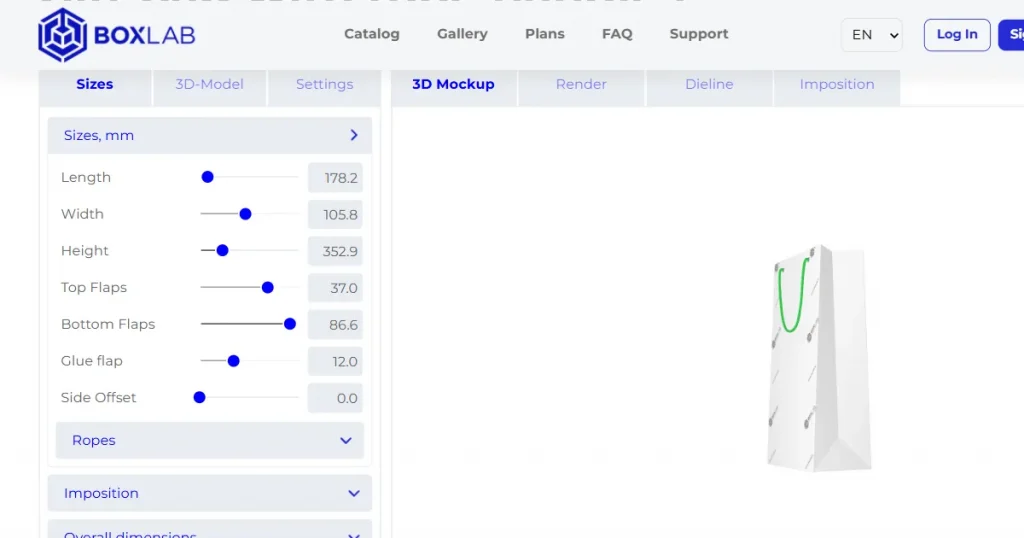
Custom Dimensions: You just enter your exact length, width, and height to instantly generate the correct structure.
Dual View: It gives you both a flat 2D dieline view and a 3D folded view.
Standout Features
Professional Export Formats: This is its entire purpose. It exports dielines in PDF, SVG, and DXF, the exact vector formats your manufacturer needs.
Cons
Not a Mockup Tool: This is not for creating pretty packaging mockups. It doesn’t apply graphics or lighting.
The Free Plan Trap: The free tier only exports JPGs (which are 100% useless for manufacturing) and watermarks the 3D models.
Pricing
Free Tier: Unlimited use of the generator for JPG-only/watermarked exports.
Paid Unlimited Plans:
Unlimited Day ($3): 24 hours of access.
Unlimited Month ($10): 30 days of access.
Actionable Tip: The $3 Unlimited One Day plan is the best deal in the industry. A perfect one-time Pacdora alternative.
Final verdict
It’s perfect for professional designers and anyone who just needs a technically accurate, manufacturable dieline. A true designer’s Pacdora alternative.
Why Modor is the Best Pacdora Alternative on Our List?
This is subjective, of course, but for the common task of creating high-quality marketing visuals, Modor is the clear winner in my book. Pacdora’s free plan is unusable because of watermarks. Modor’s free plan is great for commercial use and has no watermarks. It’s one of the best mockup tools we’ve all been waiting for.
The AI blending feature also delivers paid-level realism that rivals Pacdora’s paid renders. Making it a stunningly good Pacdora alternative.
If your primary goal is not to create a technical dieline, Modor provides 90% of the visual quality for minimal cost.
Frequently Asked Questions
How to use Pacdora for free?
You can sign up for a Pacdora free account, but let’s be real, it’s a trial. It’s highly restrictive, and all your 3D mockups and video exports will be watermarked.
Does Pacdora offer Dieline templates?
Yes, this is one of Pacdora’s core strengths. It has a library of over 3,000 dieline templates. But this is a key feature of the Pacdora paid plan: exporting them as professional vector files (AI, PDF, DXF).
What’s the best free alternative to Pacdora?
It really depends on your needs. For free marketing mockups, Modor is the clear winner. It offers the best free plan with high-resolution, unwatermarked mockups. It’s the best mockup tool with the most generous free plan on this list. For free dielines, there is no professional free option. The cheapest is BOXLAB’s $3 Unlimited Day pass. No genuine free Pacdora alternative exists for this.
Which Pacdora alternative is best for packaging design?
This has two parts: For Technical Structural Design: BOXLAB is the top Pacdora alternative for generating professional, vector-based dielines for manufacturing. For Visual Design & AI Brainstorming: Packify is a powerful Pacdora alternative for its AI Photoshoot feature, and Kittl is great for AI-assisted graphic design.
What’s the best overall Pacdora alternative?
Modor is the best overall Pacdora alternative because of its large mockup library of 1000+ templates, easy-to-use editor, AI-powered automation, and commercial licensing even on the free plan.
Is there a free Pacdora alternative for creating realistic packaging mockups?
Yes. Modor is a free Pacdora alternative that lets you create realistic packaging mockups with AI-powered design blending, high-resolution exports, and no watermarks on its free plan.
What is the best Pacdora alternative for quick packaging mockups?
Modor is one of the best Pacdora alternatives for fast, realistic packaging mockups. Its simple editor and AI-powered blending let you create professional visuals without complex 3D tools.